
Subscriptions & renewals
You can't cut what you can't see.See everything.
ClearSpend AI builds a live portfolio from Gmail, Drive, Slack, and your cards — with owner, usage, and renewal dates on every tool. Act before the charge, not after the surprise.
7-day free trial. No credit card required.
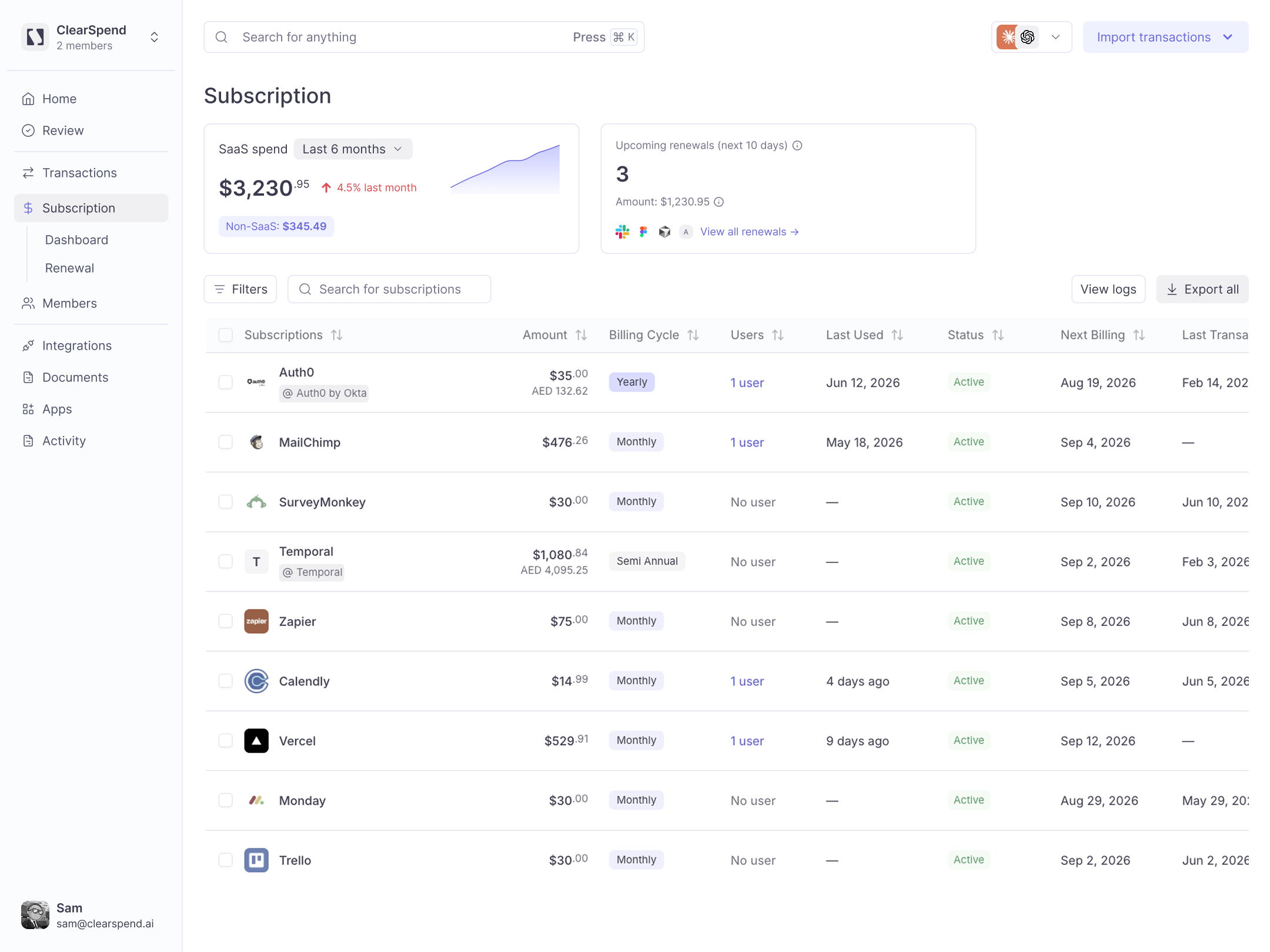
Live portfolio in one view
Every SaaS tool auto-discovered from Gmail, Drive, Slack, and cards — with price, category, and status so nothing hides in a side inbox.
Owners and usage on every tool
Know who to ask before you renew, and spot unused seats before you pay for them again.
Renewals as a byproduct
Upcoming charges are already on the portfolio — flagged early and routed to the owner, without a separate process to run.
How it works
Portfolio first.Renewals follow.
Connect once. ClearSpend AI keeps the portfolio live — renewals are already on it when you need to act.
Connect sources
Link Gmail, Drive, Slack, and cards. ClearSpend AI reads receipts and charges — it never sends or changes anything.
Live portfolio
Tools appear with price, owner, and usage — a single view of what the company actually pays for.
Act before renewals
Upcoming renewals surface from the portfolio and route to owners in time to cancel, downgrade, or renegotiate.
Alerts
Route renewals toSlack and email
When a tool is about to renew, ClearSpend AI notifies the owner in Slack and by email — with time to cancel, downgrade, or renegotiate before the charge hits.
Calendar sync
Renewals, synced toyour calendar
Renewal dates land on the calendar your team already opens — so upcoming charges show up next to the rest of the week.
Why teams switch
What you stop paying for
$20K+
Average first-year savings from canceling unused subscriptions
7
Unused tools typically flagged before the next renewal cycle
0
Surprise renewals when owners get alerts with time to act
AI assistant MCP
Ask AI to learn more about your SaaS spend
OAuth 2.1 authentication — no API keys to manage.Learn more
FAQs
Common questions
ClearSpend AI connects to Gmail, Google Drive, Slack, and your company cards, then automatically detects every SaaS charge — surfacing who owns each tool, when it renews, and whether anyone still uses it. No manual inventory to maintain.
Once your portfolio is live, upcoming renewals are flagged early and routed to the right owner — in Slack or email — so you have room to cancel, downgrade, or renegotiate before the card is charged.
Yes. Every subscription shows its owner, so you always know who to ask before renewing, downgrading, or canceling — instead of chasing Slack threads.
ClearSpend AI flags subscriptions with little or no recent activity, so unused and forgotten tools surface automatically — letting you cancel or downgrade before the next charge.
No. Renewals are a byproduct of the live portfolio. Dates, urgency, and owner routing come with visibility — you don’t babysit a second system or spreadsheet.
Spreadsheets go stale the week after someone updates them. ClearSpend AI keeps discovering subscriptions and matching charges automatically, so the portfolio — and the renewals on it — stay current without a weekly ritual.